

Context Window Management
Token Limits, Chunking Strategies, Memory Compression, and Sliding Windows

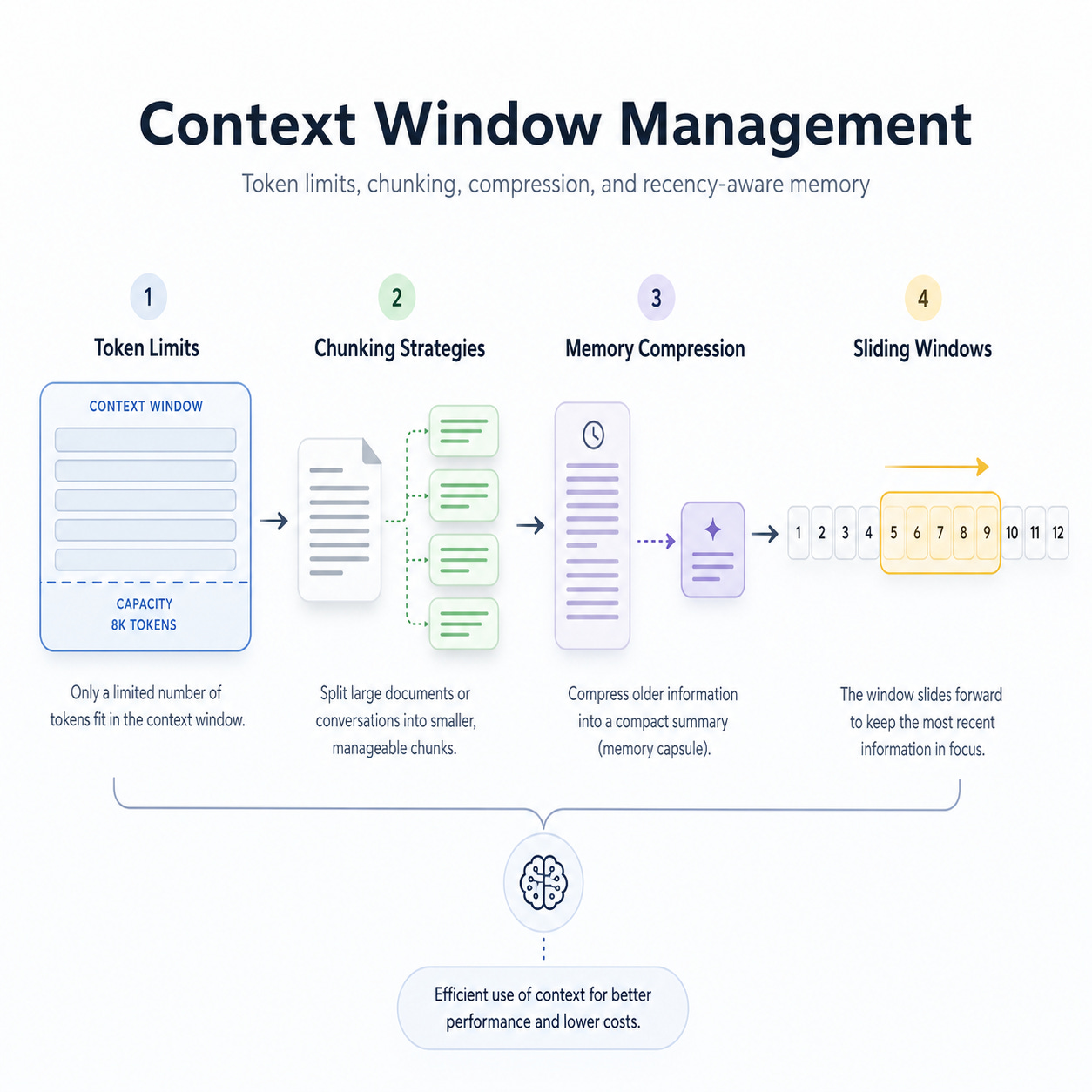
Context window management is the discipline of deciding what information enters the LLM prompt, what gets summarized, what gets retrieved, what gets dropped, and how to preserve task quality under token, latency, and cost constraints.
1. What Is Context Window Management?
In LLM systems, the context window is the maximum number of input and output tokens the model can process in a single request.
Example:
↳ User query
↳ System prompt
↳ Developer instructions
↳ Chat history
↳ Retrieved documents
↳ Tool results
↳ Memory
↳ Output response
All of these consume tokens.
The challenge is:
How do we fit the most relevant information into a limited context window without losing quality, increasing latency, or causing hallucination?
2. Core Interview Concepts
Token Limits
A token limit specifies the maximum amount of text the model can handle in a single call.
Important considerations:
↳ Input tokens consume context space
↳ Output tokens also need a reserved space
↳ Large context windows increase latency and cost
↳ More context does not always mean better answers
↳ Irrelevant context can distract the model
↳ Long prompts can degrade instruction-following if poorly structured
Strong interview answer:
I do not simply maximize the context window. I optimize context by ranking relevance, compressing memory, reserving output budget, and using retrieval or summarization when the conversation exceeds the available token budget.
Chunking Strategies
Chunking means splitting documents, logs, conversations, or knowledge into smaller units that can be retrieved and inserted into the prompt.
Common strategies:
↳ Fixed-size chunking
↳ Recursive text splitting
↳ Semantic chunking
↳ Sentence-aware chunking
↳ Section/header-based chunking
↳ Sliding-window chunking
↳ Parent-child chunking
↳ Hierarchical chunking
↳ Code-aware chunking
↳ Table-aware chunking
Best practice:
The chunking strategy should match the data type. Legal documents, source code, chat history, PDFs, and API logs should not be chunked the same way.
Memory Compression
Memory compression reduces long conversation histories or documents into smaller representations.
Examples:
↳ Conversation summarization
↳ Entity memory
↳ Task-state memory
↳ User preference memory
↳ Episodic memory summaries
↳ Extracted facts
↳ Key-value memory
↳ Vectorized long-term memory
↳ Rolling summaries
↳ Map-reduce summarization
Strong interview point:
Compression should preserve decision-relevant information, not just shorten text. A bad summary can permanently remove critical context.
Sliding Windows
Sliding windows keep only the most recent part of the context while discarding or summarizing older information.
Example:
Turn 1  Turn 2  Turn 3  Turn 4  Turn 5  Turn 6
[old]   [old]   [summary] [recent] [recent] [current]
Used for:
↳ Chatbots
↳ Agent workflows
↳ Log analysis
↳ Streaming documents
↳ Long conversations
↳ Multi-step reasoning
↳ Customer support assistants
Strong interview answer:
I use a sliding window for short-term recency, but I combine it with summaries and retrieval so older but important information is not lost.
3. Production Architecture for Context Window Management
User Query
   ↓
Conversation State Manager
   ↓
Token Budget Estimator
   ↓
Context Selection Layer
   ↳ Recent messages
   ↳ System instructions
   ↳ Retrieved documents
   ↳ User memory
   ↳ Tool results
   ↳ Summaries
   ↓
Ranking + Deduplication
   ↓
Compression Layer
   ↳ Summarize
   ↳ Extract facts
   ↳ Remove noise
   ↳ Merge overlapping chunks
   ↓
Prompt Builder
   ↓
LLM Response
   ↓
Memory Update
   ↳ Save useful facts
   ↳ Update rolling summary
   ↳ Store embeddings
   ↳ Drop irrelevant content
4. How to Manage Token Budget
A production system should explicitly reserve tokens.
Example token budget:
Total context window: 128k tokens

System prompt:         2k
Developer rules:       1k
User query:            1k
Recent conversation:   10k
Retrieved documents:   40k
Tool outputs:          20k
Memory summaries:      10k
Output reserve:        8k
Safety buffer:         5k
Unused margin:         31k
Key idea:
Always reserve output tokens before filling the input context.
Bad approach:
Use all available context for input and hope the model has enough room to answer.Good approach:
Estimate input tokens, reserve output tokens, prioritize relevant context, and compress or drop low-value context.5. Practical Chunking Strategies
Fixed-Size Chunking
Splits text every N tokens.
Example:
Chunk size: 500 tokens
Overlap: 50 tokens
Pros:
↳ Simple
↳ Fast
↳ Easy to implement
Cons:
↳ Can split the meaning in the middle
↳ Bad for legal, academic, and technical documents
↳ May separate the question from the answer
Use case:
↳ Basic RAG prototype
↳ Large unstructured documents
↳ Simple FAQ retrieval
Recursive Chunking
Splits text using natural boundaries first.
Typical priority:
Paragraph → Sentence → Word → TokenPros:
↳ Preserves structure better
↳ Good default for RAG systems
↳ Works well for articles, docs, and reports
Use case:
↳ Documentation assistant
↳ Academic paper assistant
↳ Customer support knowledge base
Semantic Chunking
Splits text based on meaning, not just size.
Pros:
↳ Better retrieval quality
↳ Keeps related ideas together
↳ Reduces irrelevant context
Cons:
↳ More expensive
↳ Requires embeddings or semantic similarity
↳ Harder to debug
Use case:
↳ Enterprise RAG
↳ Legal search
↳ Research assistants
↳ Long policy documents
Parent-Child Chunking
Stores small child chunks for retrieval but returns larger parent chunks for context.
Example:
Document
  ↳ Section
      ↳ Paragraph chunk
      ↳ Paragraph chunk
      ↳ Paragraph chunk
Retrieval searches small chunks, but the prompt includes the broader parent section.
Why it matters:
↳ Improves retrieval precision
↳ Preserves the surrounding context
↳ Reduces fragmented answers
Strong interview answer:
I often use child chunks for retrieval and parent chunks for generation because retrieval benefits from granularity, while generation benefits from context continuity.
Sliding-Window Chunking
Each chunk overlaps with the previous chunk.
Example:
Chunk 1: tokens 0–500
Chunk 2: tokens 400–900
Chunk 3: tokens 800–1300
Pros:
↳ Prevents boundary loss
↳ Good for long narratives
↳ Useful for logs and transcripts
Cons:
↳ Duplicates tokens
↳ Increases storage
↳ Can return redundant chunks
Best practice:
↳ Use overlap carefully
↳ Deduplicate retrieved chunks
↳ Avoid excessive overlap
6. Memory Compression Patterns
Rolling Summary
Keeps a compressed summary of older conversation turns.
Old conversation → Summary
Recent conversation → Raw messages
Current query → Full detail
Useful for chatbots.
Risk:
↳ Summary drift
↳ Loss of details
↳ Incorrect assumptions
Mitigation:
↳ Include structured facts
↳ Store decisions separately
↳ Periodically regenerate summaries
↳ Keep source references when possible
Entity Memory
Extracts important entities.
Example:
User:
- Name: Lamhot
- Goal: Prepare for AI engineering interviews
- Preferred format: structured Q&A
- Topics: RAG, agents, LLM evaluation
Useful for personalization.
Risk:
↳ Privacy issues
↳ Stale information
↳ Over-personalization
Mitigation:
↳ Store only useful long-term facts
↳ Allow deletion
↳ Track confidence and timestamp
Task-State Memory
Stores the current state of a workflow.
Example:
Task: Build AI interview guide
Completed:
- RAG chapter
- Agent memory chapter
- Context window chapter

Next:
- Add mock Q&A
- Add system design questions
Useful for agents and long workflows.
Extractive Compression
Instead of summarizing freely, extract key facts.
Example:
Original:
The user wants a production-grade RAG system using LangGraph, hybrid retrieval, reranking, LangSmith, Docker, and CI/CD.

Extracted:
- Framework: LangGraph
- Retrieval: BM25 + vector search
- Reranking: cross-encoder
- Observability: LangSmith
- Deployment: Docker + CI/CD
This is safer than abstractive summarization when precision matters.
7. Interview Q&A
Q1. What is context window management in LLM systems?
Answer:
Context window management is the process of controlling which information is passed to an LLM in a request within a fixed token budget. It includes managing system prompts, user queries, chat history, retrieved documents, tool outputs, and memory.
A strong system does not blindly include everything. It ranks context by relevance, compresses older information, reserves output tokens, removes redundancy, and uses retrieval to bring in only the most useful external knowledge.
In production, context window management directly affects:
↳ Answer quality
↳ Hallucination risk
↳ Cost
↳ Latency
↳ Personalization
↳ Multi-turn coherence
Q2. Why is a larger context window not always better?
Answer:
A larger context window gives the model more room, but it does not automatically improve quality.
Problems with very large context:
↳ Higher latency
↳ Higher cost
↳ More irrelevant information
↳ Increased attention dilution
↳ Harder prompt debugging
↳ More chance of conflicting context
↳ Harder source attribution
In a production system, I prefer context precision over context volume. I would rather provide 5 highly relevant chunks than 100 weakly relevant chunks.
Q3. How do you decide what to include in the prompt?
Answer:
I use a priority-based context selection strategy.
Priority order:
↳ System instructions
↳ Current user query
↳ Required safety or policy constraints
↳ Recent conversation turns
↳ Task-state memory
↳ Retrieved documents relevant to the query
↳ Tool outputs
↳ User preferences
↳ Older summarized conversation
Then I apply:
↳ Token budget estimation
↳ Relevance scoring
↳ Deduplication
↳ Compression
↳ Output token reservation
The final prompt should contain the smallest amount of context needed to answer correctly.
Q4. What is the difference between chunking and summarization?
Answer:
Chunking splits information into smaller, retrievable units. Summarization compresses information into a shorter representation.
Chunking is mainly used before retrieval. Summarization is used when information is too long to fit into the context window.
Example:
↳ Chunking: Split a 100-page policy document into sections
↳ Summarization: Compress a 20-turn conversation into a 500-token memory summary
In RAG systems, chunking helps retrieve relevant knowledge. In conversational agents, summarization helps preserve older context.
Q5. What chunk size would you use for RAG?
Answer:
It depends on the document type and use case.
For general documentation, I might start with:
Chunk size: 300–800 tokens
Overlap: 50–150 tokens
For code:
Chunk by function, class, file, or module
For legal or policy documents:
Chunk by section, clause, heading, and subsectionFor customer support:
Chunk by FAQ entry, troubleshooting step, or article sectionI would not blindly choose a chunk size. I would evaluate retrieval quality using metrics such as recall@k, precision@k, MRR, answer fidelity, and human review.
Q6. What is chunk overlap, and why does it matter?
Answer:
Chunk overlap means repeating some tokens from one chunk into the next chunk.
Example:
Chunk 1: tokens 0–500
Chunk 2: tokens 450–950
The overlap helps preserve context at boundaries. Without overlap, important information may be split across chunks.
However, too much overlap can create problems:
↳ More storage
↳ More duplicate retrieval
↳ Higher prompt cost
↳ Redundant evidence
↳ Lower diversity in retrieved results
I usually tune overlap based on retrieval performance and document structure.
Q7. How would you handle a long user conversation that exceeds the context window?
Answer:
I would use a layered memory strategy.
Architecture:
Recent messages → kept verbatim
Older messages → summarized
Important facts → extracted into structured memory
Task state → stored separately
Long-term knowledge → stored in vector DB
At each turn, I would:
↳ Estimate token usage
↳ Keep the latest N turns
↳ Compressing older turns into a rolling summary
↳ Extract durable facts
↳ Retrieve relevant old memories if needed
↳ Drop low-value or redundant content
This gives the model both recency and continuity.
Q8. What are the risks of summarizing chat history?
Answer:
The biggest risks are:
↳ Losing important details
↳ Summary drift
↳ Introducing incorrect facts
↳ Removing user constraints
↳ Forgetting decisions
↳ Over-compressing technical requirements
To mitigate this, I separate memory into different layers:
↳ Free-text summary
↳ Structured facts
↳ Decisions made
↳ Open tasks
↳ User preferences
↳ Source references
For critical workflows, I would also retain the raw history and regenerate summaries as needed.
Q9. What is a sliding window approach?
Answer:
A sliding window keeps the most recent part of the conversation or document in the prompt and moves older content out of direct context.
Example:
Keep:
- Last 10 messages
- Current task state
- Relevant retrieved memory

Compress:
- Older messages

Drop:
- Irrelevant small talk
- Repeated content
Sliding windows are useful because recent context usually has the highest relevance. But pure sliding windows can forget important older information, so I combine them with retrieval and memory summaries.
Q10. How do you prevent important old information from being lost in a sliding window?
Answer:
I use importance-aware memory retention.
Instead of keeping only recent messages, I identify and preserve:
↳ User constraints
↳ Requirements
↳ Decisions
↳ Preferences
↳ Deadlines
↳ Tool results
↳ Errors and resolutions
↳ Business rules
Then I store them in structured memory or vector memory.
At the prompt time, I retrieve relevant older memories based on the current query.
8. System Design Interview Question
Q11. Design a context window management system for a customer support AI assistant.
Strong Answer:
I would design the system with five layers.
1. Input Layer
Receives:
↳ User query
↳ Conversation history
↳ Customer profile
↳ Order details
↳ Support policies
↳ Tool outputs
2. Token Budget Manager
Calculates available space:
available_input_tokens =
model_context_window
- reserved_output_tokens
- system_prompt_tokens
- safety_buffer_tokens
This prevents the system from overfilling the prompt.
3. Context Selection Layer
Selects:
↳ Current user query
↳ Last few conversation turns
↳ Relevant customer metadata
↳ Retrieved support articles
↳ Recent tool outputs
↳ Compressed conversation summary
4. Compression Layer
Compresses:
↳ Long tool responses
↳ Old chat history
↳ Retrieved documents
↳ Repetitive content
Uses:
↳ Extractive summarization
↳ Structured fact extraction
↳ Deduplication
↳ Relevance filtering
5. Prompt Assembly Layer
Builds final prompt:
System rules
Customer support behavior
Current user issue
Relevant account/order state
Retrieved policies
Recent conversation
Compressed memory
Answer format instructions
6. Memory Update Layer
After the response:
↳ Update conversation summary
↳ Store unresolved issues
↳ Store preferences if appropriate
↳ Save the escalation reason
↳ Track retrieved sources used
This architecture balances cost, latency, personalization, and answer quality.
9. Advanced Interview Questions
Q12. How do you evaluate whether your context management strategy works?
Answer:
I would evaluate it across retrieval, generation, and system metrics.
Retrieval metrics:
↳ Recall@k
↳ Precision@k
↳ MRR
↳ nDCG
↳ Context relevance
Generation metrics:
↳ Faithfulness
↳ Answer correctness
↳ Citation accuracy
↳ Hallucination rate
↳ Instruction-following
↳ Completeness
System metrics:
↳ Token usage
↳ Latency
↳ Cost per request
↳ Context compression ratio
↳ Number of retrieved chunks
↳ Prompt overflow rate
↳ User satisfaction
↳ Escalation rate
The best strategy is not just the cheapest or shortest. It must preserve answer quality while reducing unnecessary context.
Q13. What is prompt overflow and how do you handle it?
Answer:
Prompt overflow happens when the assembled prompt exceeds the model’s context limit.
To handle it:
↳ Reserve output tokens first
↳ Count tokens before calling the model
↳ Rank context by importance
↳ Drop low-priority items
↳ Compress the older conversation
↳ Summarize long tool outputs
↳ Limit retrieved chunks
↳ Use reranking before insertion
↳ Use fallback models with a larger context only when needed
Production systems should never discover overflow only after the API call fails. Token budgeting should happen before inference.
Q14. How do you handle long tool outputs?
Answer:
I would not blindly insert raw tool outputs.
For long tool outputs, I would:
↳ Parse the response
↳ Extract relevant fields
↳ Summarize if needed
↳ Remove irrelevant rows
↳ Preserve IDs, timestamps, and critical values
↳ Store raw output externally
↳ Insert only the useful subset into the prompt
Example:
Instead of passing 10,000 rows from a database query, I would pass:
Top matching orders:
- Order ID
- Status
- Delivery estimate
- Relevant exception
- Last updated timestamp
This reduces cost and improves model reliability.
Q15. What is the difference between short-term memory and long-term memory in context management?
Answer:
Short-term memory usually means the recent conversation context that remains directly available to the model.
Long-term memory is stored outside the context window and retrieved when relevant.
Short-term memory:
↳ Recent chat turns
↳ Current task state
↳ Latest tool results
↳ Immediate instructions
Long-term memory:
↳ User preferences
↳ Past decisions
↳ Historical conversations
↳ Stored documents
↳ Vector database entries
↳ Structured profile data
A good system uses both. Short-term memory supports coherence. Long-term memory supports continuity across sessions.
10. Common Failure Modes
Failure Mode 1: Too Much Irrelevant Context
Problem:
↳ The model gets distracted
↳ Latency increases
↳ Cost increases
↳ Answer quality drops
Fix:
↳ Rerank chunks
↳ Filter by relevance threshold
↳ Deduplicate context
↳ Use metadata filters
Failure Mode 2: Chunk Boundary Loss
Problem:
↳ Important information is split between chunks
Fix:
↳ Use overlap
↳ Use semantic chunking
↳ Use parent-child retrieval
↳ Chunk by natural document structure
Failure Mode 3: Summary Drift
Problem:
↳ The memory summary becomes inaccurate over time
Fix:
↳ Store structured facts separately
↳ Keep raw history in storage
↳ Regenerate summaries periodically
↳ Validate summaries against source text
Failure Mode 4: Lost User Constraints
Problem:
↳ The model forgets requirements like “use Python,” “do not use tables,” or “cite sources.”
Fix:
↳ Extract constraints into task-state memory
↳ Keep active constraints near the top of the prompt
↳ Use a prompt validation step before generation
Failure Mode 5: Retrieval Stuffing
Problem:
↳ The system inserts too many retrieved chunks into the prompt
Fix:
↳ Retrieve many, rerank down
↳ Use top-k after reranking
↳ Use diversity filtering
↳ Use context compression
↳ Use query-specific chunk selection
11. Senior-Level Answer Pattern
Use this structure in interviews:
Context:
LLMs have finite context windows, and production systems must decide what information enters the prompt.

Constraint:
Naively adding everything increases latency, cost, and hallucination risk.

Architecture:
I use token budgeting, relevance ranking, retrieval, compression, sliding windows, and memory layers.

Implementation:
Recent messages stay raw, older messages are summarized, durable facts are extracted, and external knowledge is retrieved using RAG.

Evaluation:
I measure answer quality, faithfulness, token usage, latency, cost, retrieval recall, and prompt overflow rate.

Failure Plan:
If the prompt exceeds the limit, I drop low-priority context, compress older history, summarize tool outputs, and preserve critical constraints.
12. Mock Interview: Strong Candidate Responses
Interviewer:
How would you design context management for a long-running AI coding assistant?
Candidate:
For a coding assistant, I would not rely only on the chat history. I would maintain separate memory layers.
First, I would keep the recent conversation in the active prompt because recent user instructions are usually important. Second, I would store project-level context externally, including repository structure, edited files, test failures, build commands, and architectural decisions.
For code retrieval, I would chunk by semantic code boundaries such as class, function, file, or module rather than arbitrary token size. I would also include dependency metadata, imports, and call relationships where possible.
For long sessions, I would use a rolling summary for previous debugging steps and a structured task state, like:
Current goal:
Fix failing authentication tests

Files touched:
auth_service.py
test_auth_flow.py

Known issue:
JWT expiration check fails for timezone-aware datetime

Next step:
Update token validation and rerun tests
Before each LLM call, I would estimate token usage, reserve output tokens, retrieve only relevant code chunks, and include the active task state. This avoids flooding the model with the entire repository.
I would evaluate the system using task success rate, patch correctness, test pass rate, retrieval relevance, token cost, and latency.
Interviewer:
How do you decide whether to summarize or retrieve old context?
Candidate:
I summarize when the old context is part of the ongoing conversation state, such as prior decisions, user preferences, or progress updates.
I retrieve when the old context is external knowledge or historical information that may or may not be relevant to the current query.
For example, in a chatbot, I would summarize older turns into a rolling memory. But in a RAG system, I would retrieve relevant knowledge base chunks dynamically based on the current question.
The key difference is:
↳ Summarization preserves continuity
↳ Retrieval brings back relevant knowledge on demand
In production, I usually combine both.
Interviewer:
How would you reduce token cost without hurting answer quality?
Candidate:
I would reduce token cost through context optimization, not blind truncation.
My approach would include:
↳ Use reranking before inserting documents
↳ Deduplicate overlapping chunks
↳ Compress long conversation history
↳ Extract structured facts from memory
↳ Summarize long tool outputs
↳ Use smaller chunks for retrieval but larger parent sections only when needed
↳ Cache stable context
↳ Use cheaper models for summarization or routing
↳ Reserve large-context models for complex cases
I would monitor token usage per request, cost per successful answer, and quality metrics like faithfulness and task completion rate.
13. Coding-Level Pseudocode
def build_context(
    user_query,
    chat_history,
    retrieved_chunks,
    tool_outputs,
    memory,
    max_context_tokens,
    reserved_output_tokens=1500,
    safety_buffer=500
):
    available_tokens = max_context_tokens - reserved_output_tokens - safety_buffer

    context_parts = []

    # Highest priority
    context_parts.append({
        "type": "user_query",
        "content": user_query,
        "priority": 100
    })

    # Recent conversation
    recent_messages = get_recent_messages(chat_history, max_turns=8)
    context_parts.append({
        "type": "recent_history",
        "content": recent_messages,
        "priority": 90
    })

    # Compressed memory
    compressed_memory = compress_memory(memory)
    context_parts.append({
        "type": "memory",
        "content": compressed_memory,
        "priority": 80
    })

    # Retrieved knowledge
    ranked_chunks = rerank_chunks(user_query, retrieved_chunks)
    deduped_chunks = deduplicate_chunks(ranked_chunks)

    for chunk in deduped_chunks:
        context_parts.append({
            "type": "retrieved_chunk",
            "content": chunk,
            "priority": chunk.relevance_score
        })

    # Tool outputs
    compressed_tools = compress_tool_outputs(tool_outputs)
    context_parts.append({
        "type": "tool_outputs",
        "content": compressed_tools,
        "priority": 85
    })

    # Sort by priority
    context_parts = sorted(
        context_parts,
        key=lambda x: x["priority"],
        reverse=True
    )

    final_context = []
    used_tokens = 0

    for part in context_parts:
        part_tokens = count_tokens(part["content"])

        if used_tokens + part_tokens <= available_tokens:
            final_context.append(part)
            used_tokens += part_tokens
        else:
            compressed = compress_text(part["content"])
            compressed_tokens = count_tokens(compressed)

            if used_tokens + compressed_tokens <= available_tokens:
                part["content"] = compressed
                final_context.append(part)
                used_tokens += compressed_tokens

    return assemble_prompt(final_context)
14. Metrics to Mention in Interviews
Quality Metrics
↳ Answer correctness
↳ Faithfulness
↳ Groundedness
↳ Completeness
↳ Citation accuracy
↳ Instruction adherence
↳ User satisfaction
Retrieval Metrics
↳ Recall@k
↳ Precision@k
↳ MRR
↳ nDCG
↳ Context relevance
↳ Chunk diversity
System Metrics
↳ Input tokens
↳ Output tokens
↳ Cost per request
↳ Latency
↳ Prompt overflow rate
↳ Compression ratio
↳ Cache hit rate
↳ Retrieval latency
↳ Reranking latency
Memory Metrics
↳ Memory recall accuracy
↳ Summary drift rate
↳ Stale memory rate
↳ User correction rate
↳ Long-session coherence
15. Final Interview-Ready Summary
Context window management is not just about fitting text into a prompt. It is about information prioritization.
A production-grade system should:
↳ Reserve output tokens
↳ Estimate token usage before inference
↳ Keep recent context raw
↳ Summarize the older context
↳ Extract structured task state
↳ Retrieve relevant long-term memory
↳ Chunk documents according to structure
↳ Rerank and deduplicate retrieved chunks
↳ Compress long tool outputs
↳ Monitor quality, latency, and cost
Best final answer:
In production LLM systems, I treat the context window as a scarce resource. I use token budgeting, relevance ranking, chunking, memory compression, and sliding windows to ensure the model receives the most useful information, not the most information. My goal is to preserve correctness, reduce hallucination, control cost, and maintain coherent multi-turn behavior over long sessions.