


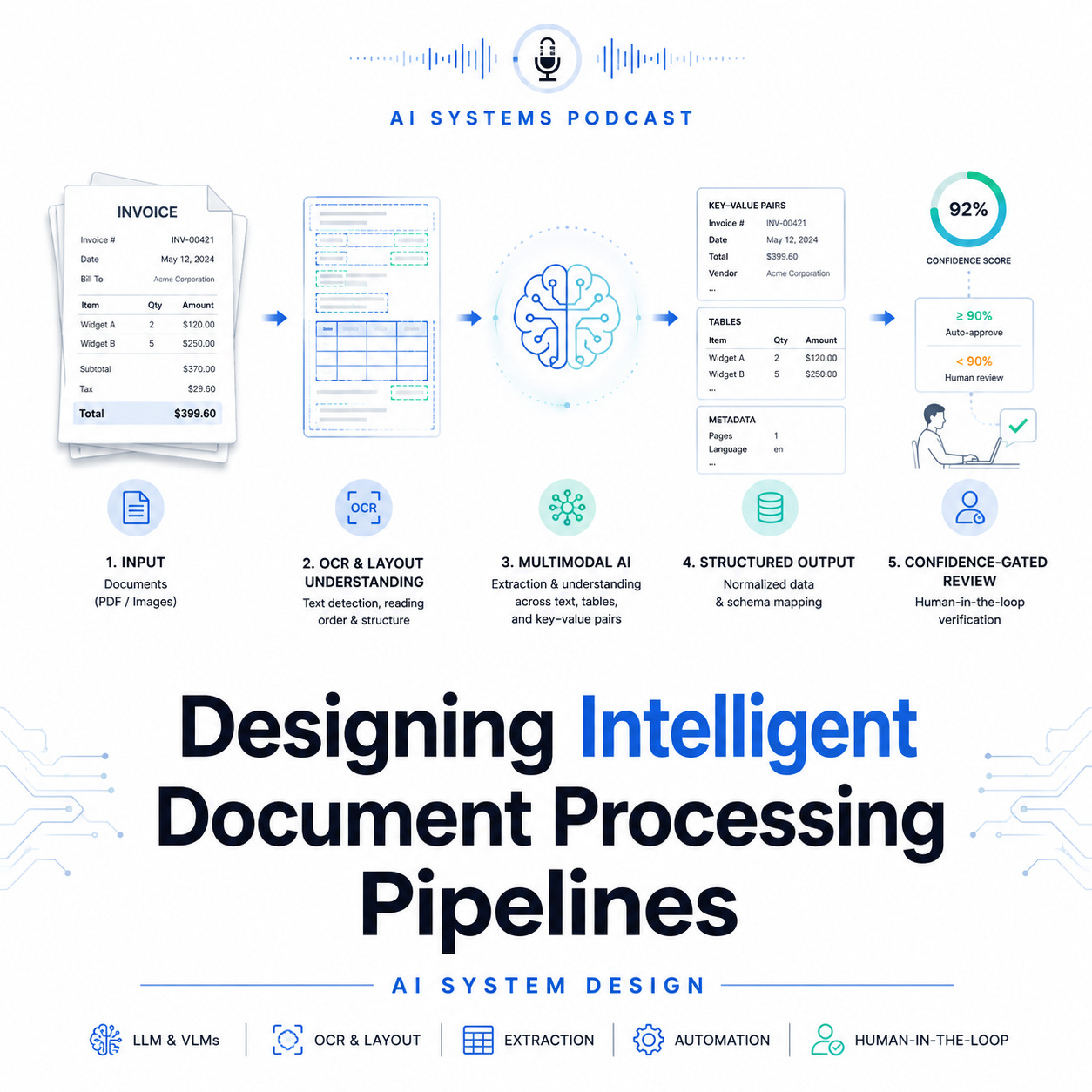
Intelligent Document Processing, or IDP, is the AI system behind automated invoice processing, insurance claim intake, loan document review, tax form extraction, and legal contract analysis. The goal is simple to explain but difficult to build well: convert messy, semi-structured, multimodal documents into reliable structured data that downstream systems can trust.
In an interview, this problem tests whether you can design beyond “OCR plus LLM.” A production-grade IDP pipeline must handle scanned PDFs, handwritten forms, tables, stamps, signatures, checkboxes, multi-page layouts, low-quality images, and domain-specific terminology. More importantly, it must know when not to automate. A strong design balances extraction accuracy, confidence calibration, human review, privacy, compliance, and continuous learning.
1. Problem Definition
The system receives documents such as invoices, insurance claims, or legal contracts and extracts structured fields.
For an invoice, examples include:
↳ vendor name
↳ invoice number
↳ invoice date
↳ purchase order number
↳ line items
↳ subtotal, tax, and total amount
↳ payment terms
For insurance claims, fields may include policy number, claimant details, incident date, diagnosis codes, claim amount, and supporting evidence.
For contracts, the system may extract party names, effective dates, renewal clauses, termination rights, liabilities, governing law, and obligations.
The core objective is not only extraction. The real objective is trustworthy automation.
A good IDP system should maximize straight-through processing while keeping financial, legal, and compliance risk under control.
2. Functional Requirements
The system should support document upload through APIs, email ingestion, batch processing, and integration with enterprise systems such as ERP, CRM, claim platforms, or legal document repositories.
It must perform:
↳ document classification
↳ OCR and text extraction
↳ layout analysis
↳ field extraction
↳ table extraction
↳ entity normalization
↳ confidence scoring
↳ validation rules
↳ human review workflow
↳ audit logging
↳ downstream export
For example, before extracting invoice fields, the system should first classify whether the document is an invoice, receipt, purchase order, statement, or unrelated attachment. This matters because each document type has a different schema, model, validation logic, and review workflow.
3. Non-Functional Requirements
In production, IDP systems are constrained by business risk.
Important requirements include:
↳ high extraction accuracy for critical fields
↳ low latency for interactive review
↳ scalable batch processing for large document volumes
↳ privacy protection for sensitive data
↳ regulatory compliance
↳ traceability and auditability
↳ model versioning
↳ human override support
↳ monitoring for drift and degradation
For financial documents, a wrong total amount or vendor name can create payment errors. For legal contracts, a missed termination clause can create legal exposure. For healthcare or insurance documents, mishandling personal data may violate compliance requirements. Therefore, confidence-gated automation is central to the design.
4. High-Level Architecture
A strong architecture has seven major stages.
1. Ingestion Layer
Documents arrive from multiple channels: web upload, email inbox, SFTP, API, cloud storage, or enterprise workflow systems. The ingestion layer stores the raw file, assigns a document ID, captures metadata, and triggers processing.
The system should preserve the original document for audit purposes.
2. Preprocessing Layer
Documents are normalized before model inference.
This may include:
↳ PDF-to-image conversion
↳ image rotation correction
↳ noise removal
↳ page splitting
↳ resolution enhancement
↳ language detection
↳ duplicate detection
Poor scans are common in real workflows. Preprocessing improves OCR quality and downstream extraction accuracy.
3. Document Classification
The system predicts the document type.
Possible approaches include:
↳ rule-based classification using keywords
↳ CNN or vision transformer models using page images
↳ text-based classifiers using OCR output
↳ multimodal models combining text and layout
A practical system often uses a hybrid approach: lightweight rules for obvious cases and ML models for ambiguous ones.
4. OCR and Layout Understanding
Traditional OCR extracts words and bounding boxes. Modern IDP needs more than text. It needs spatial understanding.
For example, in an invoice, the phrase “Total” may appear near several values: subtotal, tax total, balance due, or amount paid. Layout matters.
The system should capture:
↳ text content
↳ bounding boxes
↳ page coordinates
↳ reading order
↳ tables
↳ key-value relationships
↳ visual markers such as checkboxes, signatures, stamps, and logos
Models such as LayoutLM-style transformers, document vision transformers, and multimodal LLMs can jointly reason over text, layout, and visual structure.
5. Field Extraction
Field extraction maps document evidence into structured schema fields.
For simple documents, key-value extraction may be enough. For complex documents, the system may need specialized extraction models.
Common strategies include:
↳ named entity recognition
↳ sequence labeling
↳ key-value pair detection
↳ table structure recognition
↳ retrieval-augmented extraction
↳ schema-constrained LLM extraction
↳ template matching for known vendors or forms
For line items, table extraction is especially important. The system must identify rows, columns, quantities, unit prices, descriptions, tax codes, and totals. This is harder than extracting simple header fields because table layouts vary widely across document formats.
6. Validation and Normalization
Raw extraction is not enough. The data must be validated.
Examples:
↳ invoice total = subtotal + tax
↳ invoice date must be before due date
↳ vendor must exist in vendor master data
↳ purchase order number must match ERP records
↳ claim amount must be within policy limits
↳ contract effective date must be valid
↳ currency must be normalized
Validation combines deterministic rules, reference data, and probabilistic confidence scores. This layer is crucial because it catches errors that the model alone may miss.
7. Human-in-the-Loop Review
Ambiguous documents are routed to human reviewers.
The human review interface should show:
↳ extracted fields
↳ confidence scores
↳ highlighted evidence in the document
↳ validation errors
↳ suggested corrections
↳ audit trail of changes
This is where confidence-gated automation becomes practical. High-confidence documents are processed automatically. Low-confidence fields are reviewed manually. The system does not need every field to be perfect; it needs to know which fields are safe to automate.
5. Confidence-Gated Automation
The most important concept in IDP system design is confidence gating.
Each extracted field receives a confidence score. The system then decides whether to auto-approve, route to review, or reject.
Example policy:
↳ confidence > 0.98 and validation passed → auto-process
↳ confidence between 0.80 and 0.98 → human review
↳ confidence < 0.80 or validation failed → manual exception queue
However, confidence should be field-specific and risk-aware.
For example:
↳ invoice total requires very high confidence
↳ vendor address may tolerate lower confidence
↳ legal termination clause requires human review if uncertain
↳ claim amount requires strict validation
This is better than using one global confidence threshold.
A mature system also calibrates confidence using historical outcomes. If the model says it is 95% confident, it should actually be correct roughly 95% of the time.
6. Model Strategy
A practical IDP platform usually combines multiple models.
OCR Model
Extracts text and coordinates from scanned documents.
Layout Model
Understands spatial relationships between text blocks, tables, and sections.
Extraction Model
Extracts fields into a predefined schema.
Validation Model
Detects inconsistencies or suspicious values.
LLM Layer
Handles complex reasoning, contract clauses, long-context interpretation, and flexible schema extraction.
The best interview answer should not blindly use an LLM for everything. LLMs are powerful but can hallucinate, be expensive, and may create privacy concerns. For high-volume invoices, a smaller fine-tuned extraction model plus rules may be cheaper and more reliable. For legal contracts, an LLM may be valuable because the language is more complex and variable.
7. Data and Labeling Strategy
Training data should include diverse document samples across vendors, industries, languages, scan qualities, and layouts.
Labels may include:
↳ document type
↳ field values
↳ bounding boxes
↳ table structures
↳ clause categories
↳ reviewer corrections
Human corrections should feed back into the training pipeline. This creates an active learning loop.
The system should prioritize labeling documents where:
↳ model confidence is low
↳ business value is high
↳ document layout is new
↳ errors frequently occur
↳ reviewer disagreement is high
This improves model quality efficiently without labeling everything.
8. Evaluation Metrics
The primary business metric is straight-through processing rate, meaning the percentage of documents processed without human intervention.
However, this metric must be balanced with quality.
Important metrics include:
↳ field-level precision and recall
↳ document-level accuracy
↳ table extraction accuracy
↳ confidence calibration error
↳ human review rate
↳ average handling time
↳ correction rate
↳ downstream rejection rate
↳ cost per processed document
↳ compliance incidents
For critical fields, precision may matter more than recall. It is better to route uncertain fields to humans than to automatically submit incorrect financial or legal data.
9. Privacy, Security, and Compliance
IDP systems often process sensitive information such as bank details, tax IDs, medical records, contracts, signatures, addresses, and personally identifiable information.
Security controls should include:
↳ encryption at rest and in transit
↳ role-based access control
↳ tenant isolation
↳ data retention policies
↳ audit logs
↳ PII redaction
↳ secure model training pipelines
↳ access monitoring
↳ compliance review
For regulated domains, the system should support explainability. A reviewer or auditor should be able to see which document region supported each extracted field.
10. Failure Modes
Strong interview answers mention failure modes.
Common failures include:
↳ OCR errors from low-quality scans
↳ incorrect document classification
↳ missed table rows
↳ wrong currency extraction
↳ hallucinated fields from LLMs
↳ poor confidence calibration
↳ new document templates causing model drift
↳ reviewer feedback not being captured
↳ privacy leakage through model prompts
↳ downstream system rejection
Mitigations include validation rules, confidence thresholds, template monitoring, active learning, fallback queues, model versioning, and strict audit logging.
Interview Summary
An intelligent document processing pipeline is not just an OCR system. It is a multimodal, confidence-gated automation platform that converts complex documents into trusted structured data.
The strongest design combines OCR, layout understanding, extraction models, validation logic, human review, and active learning. The system should automate high-confidence cases while safely escalating uncertain or high-risk fields to humans.
In an interview, emphasize the tradeoff between automation and risk. The best IDP system is not the one that extracts the most fields automatically. It is the one that maximizes straight-through processing while preserving accuracy, compliance, and business trust.


